Showing posts with label create DVD. Show all posts

Tuesday, July 9, 2013

All-In-One Blu Ray Ripper : Aiseesoft Blu-ray Ripper Review

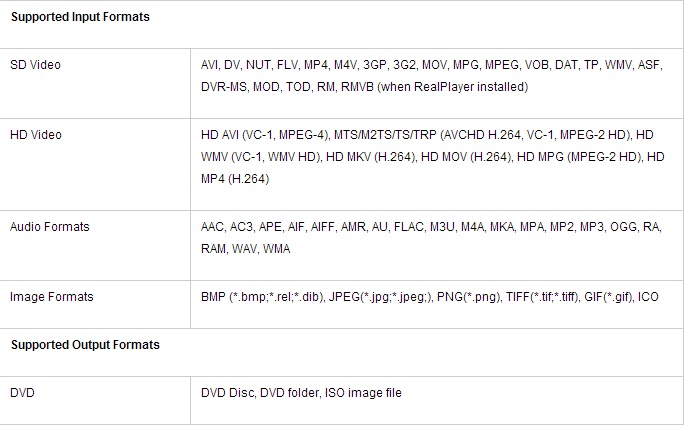
Aiseesoft Blu-ray Ripper is really an all-in-one Blu-ray Converter to rip Blu-ray Disc/m2ts video, common DVD and convert popular video files to any other video/audio formats, such as MP4, AVI, WMV, MKV, FLV, SWF, and even HD video including HD AVI, HD XviD/DivX, HD MP4, MOV, HD WMV files. This Blu-ray Ripper provides lots of useful editing functions. You can trim, crop, watermark your videos and even join pieces of videos or audios together.

Also this Blu-ray Ripper can help create DVD disc, DVD folder or ISO files with popular video files. And it can even export iPhone files to computer and import local files to iPhone easily.


Key Features
  • Rip Blu-ray/DVD to video and audio
  • Create DVD with popular video files
  • Transfer files between iPhone and PC
  • Powerful video editing functions
  • Adjust video output settings
  • Best user experience
  • Support 5.1 Dolby surround sound
Specification


Top Feedback

  • Rip Blu Ray, DVD and convert video(HD video) all in one software
  • Support extract audio from dvd and video
  • Does not support .swf input
  • Allow users to do some basic video editing, trim, crop, merge, snapshot and watermark
  • Support many output formats and also many default profile is really useful
  • Does not support multi-language
Focal Spot Tracking
Blu-ray/DVD ripper, video converter and even video editor, Aiseesoft Blue Ray Ripper is really an all-in-one Blu Ray Ripper. There are three different versions for different demand may met, standard, platinum, and ultimate.

Compare with these three editions of Aiseesoft Blu Ray Ripper, the obvious things we can see are platinum version also includes DVD creator, and with ultimate version you can also make iPhone ringtones. A Blu-ray & video player included in ultimate edition. Aiseesoft Blu Ray Ripper Ultimate is not only supported export file types from Apple devices to PC, but also supported backup file types and even supported import file types from PC to Apple devices. That must can be called i-Ripper.

Now, you can use Aiseesoft Blu Ray Ripper promo code: EASY-RABG-ISEE with 50% off on moyeamedia.com. Enjoy it with Blu Ray, it will never let you down.

Tuesday, June 4, 2013

All-in-one photo & video to DVD slideshow: Wondershare DVD Slideshow Builder (Standard & Deluxe)

Wondershare DVD Slideshow Builder Standard will help you to create and share a photo movie masterpiece.


Looking for an easy yet impressive way to burn your photos to DVD or share photos online? With Wondershare DVD Slideshow Builder Standard, literally drop-in your favorite photos and music, add built-in cinematic effects with a click and instantly create a compelling photo slideshow complete with title menu, soundtrack and even special effects.

Features
  • Breathe new life into vacation, wedding, graduation and other albums.
  • Harness the creative power of 210+ custom slide templates and editing tools.
  • Look like a pro with built-in film effects.
  • Premier and share your shows on YouTube, Facebook, iPhone and more.
Specification


Comparison of the Two Versions


Top Feedback
  •   Maybe lower the price to reflect what it does and doesn't do for standard version
  •   Add more effects that makes the much more different from Windows Movie Maker
Focal spot tracking

Nothing could be perfect but the price. As we all known, price is always important fact for us to make a decision when we choose something. Recently, Wondershare Software have announced that all its products at website moyeamedia.com were on discounts with up to 45% off.  The price of Wondershare DVD Slideshow Builder Standard is $21.97 and the deluxe version is $31.48. The price is almost the same, and the deluxe one is really much more powerful than the standard one. 

So you can search "wondershare" at moyeamedia.com get the big deal, of course you can search "Wondershare DVD Slideshow Builder" directly.

Monday, May 27, 2013

A wonderful DVD creator: Wondershare DVD Creator

Want to make your own movies? Or maybe you just want to finally burn that film collection on your computer to DVD. Whatever you want to watch, Wondershare DVD Creator does it all.

Simply drag your favorite feature film into DVD Creator, adjust the quality and click burn. Or use DVD Creator’s powerful built-in editor to combine your own photos, videos and music into home movies, slideshow, really whatever your imagination can handle.

Pros
  • Burn Video, Photos and Audio in Any Format.
  • Built-in editor is offered for retouching imported videos.
  • Support all popular recordable disc types: DVD–5 and DVD–9; DVD-R, DVD+R, DVD-RW, DVD+RW, DVD+R DL, DVD-R DL, DVD-RAM.
  • Customize DVD with 40 free static and dynamic DVD menu templates.
Cons
  • External audio tracks are not supported
  • External subtitle is not supported.
  • Not support adding 3D effect.

The Verdict
  • Easy to use, does exactly what it's supposed to. In today's society it's hard to find a real value but this is it.
Specification

In a recent survey, there are 613 valid participants, about 80% among them thought the software was really wonderful, they could make their home movie easier and faster. Even so the soft still has its limitation, the maintain feedback as the following table shows.


Now, the publisher Wondershare software make a decision that adjust the mostly products' price with coupon code up to 45% off. You can search "wondershare" at moyeamedia.com get the big deal.