Showing posts with label edit video. Show all posts

Thursday, June 6, 2013

Magic video tool: Pavtube Media Magician for Windows and Mac

Pavtube Media Magician is a powerful camcorder resource manager and converter. It will help manage and convert camcorder footage on Windows or Mac, directly upload videos to YouTube for sharing, or output for further editing. Notable features include smart camcorder wizard, timeline-oriented editing, accurate trimming and cutting, lossless joining MTS/ M2TS/ MOD/ TOD to original format or MKV, Apple ProRes ouput for FCP editing (Mac only), and more.

Key features:

  • Smart Camcorder Wizard helps import and backup with clicks.
  • Transcode camcorder AVCHD MTS/ M2TS/ MXF/ MOV, and common TiVo, MKV, etc.
  • Capture clear image from source video.
  • Add 3D effect to camcorder videos converting 2D to 3D.
  • Accurate trim and cut videos on timeline.
  • Multi-task and multi-format conversion at one time.
  • Lossless combine MTS/ M2TS/ MOD/ TOD to original format or MKV.
  • Output files for FCP/ iMovie/ FCE, etc. (Mac only)
  • Convert files for editing in Avid Studio/ Adobe Premiere/ Sony Vegus, etc.
  • Convert camcorder and common videos for Apple and Android tablets and phones.
  • Upload to YouTube directly with account and video info.


Specification:


Top Feedback:
  • Be able to rotate a video at import or before edit for output
  • Looks good, sounds good, has to be good
  • Preserve MKV subtitles and 5.1 sound  
  • Trim MKV files without reencoding
  • Remove shaking from a video
  • support full screen mode on Netbook
  • Installed fine
Focal spot tracking

Video editing software is often difficult for beginners, in part because the terminology used to label controls is unfamiliar and in part because the number of controls and unfamiliar terms is often vast. Beginners can sometimes be forgiven for wondering if they accidentally obtained a foreign language version. But once you install this software, you can see the hopeful user guide, and the friendly user interface. And this is really deservedly named magician.

Now, you can learn more at its officer website, and you can also get the coupon code with 20% off at here.

Monday, June 3, 2013

Best-Video-Converter to Mobile on 100% off: WinX Mobile Video Converter


WinX Mobile Video Converter is designed to give you a brand-new video converting and editing experience across Samsung Galaxy, HTC, Amazon Kindle Fire, Microsoft WP8, Google Nexus, Apple iPhone, iPad, Nokia, etc. It’s time to manage your video files and give them a new look!

Key features:

  • Support 320 video codecs and 60 audio codecs. Build with 200 profiles, covering about 60 popular Android and WP8 mobile phones/tablets.
  • Support MKV, AVCHD, Blu-ray M2TS videos, WMV, AVI, MP4, MPEG, FLV, VPX 8, WebM videos, etc, as input.
  • Convert any videos to Android phones, e.g. The New HTC One, Galaxy S3/S4, Motorola, Acer and iPhone, Nokia, etc.
  • Convert and play any videos on Google Nexus 7, Kindle Fire, HTC, Samsung, Asus, iPad and other tablets..
  • Grab music from videos to save as MP3/AAC/FLAC/ALAC audio.
  • Edit videos by enabling merging, cropping, trimming, and adding external *.srt subtitle to your downloaded movies.
  • Deliver 15x faster real-time conversion speed with first-class video audio quality.


Specification:

Top feedback:

  • Kindle conversion make more transparent and easy 
  • Add support for ATI Stream and CUDA
  • Support a different class of mobile device 
  • Add a estimated filesize preview
  • conversion for Nook 
Focal Spot Tracking:

Nowadays, we can see smartphone here and there, the number of people who own a smartphone is already one billion. For most people,  watch videos on their smartphone is becoming a part of their life.  But videos always have different formats that can not supported by the phone. So we need a video converter software, the professional and the lowest price always be the better one. WinX Mobile Video Converter just meet the two points when the publisher announce the big discount  with 100% off, Time-limited Giveaway.

Also big deal for you, if you want get more information about the series software of WinX published by Digiarty Software, you can search  "WinX" at website moyeamedia.com. This also works to famous-brand products.

Friday, May 31, 2013

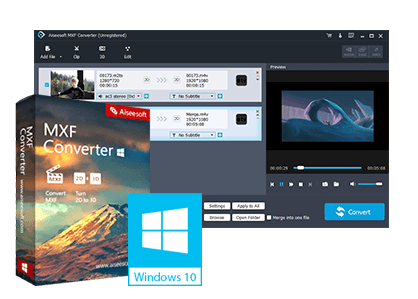
The best MXF converting solution tool: Aiseesoft MXF Converter (for Win and Mac)


Aiseesoft MXF Converter (Win/Mac) is the full-featured software designed for MXF file mainly recorded by Panasonic DVCPRO P2, Sony XDCAM, and Canon XF camcorder. The powerful software can convert MXF file to various video formats like MOV, AVI, WMV, MP4 etc supported by editor Sony Vegas, Adobe Premiere, Avid Media Composer, Apple ProRes, iMovie, DVCPRO, HDV, Avid DNxHD, XDCAM, and Apple InterMediate Codec. Plus the software can convert 2D MXF video to 3D video.


The converting speed is ultrafast. It can also convert MXF/P2 MXF files to mobile devices supported video formats, such as iPad, iPhone, iPod, PSP, Samsung Galaxy Note 2, Samsung Galaxy S4 and so on. Also this MXF Converter provide users with some basic video editing features for you to get perfect output video quality.

Key Features of MXF Converter
  • Convert MXF format to popular video
  • Convert 2D MXF to 3D
  • Customize MXF recordings to be perfect
  • Batch conversion and convenience
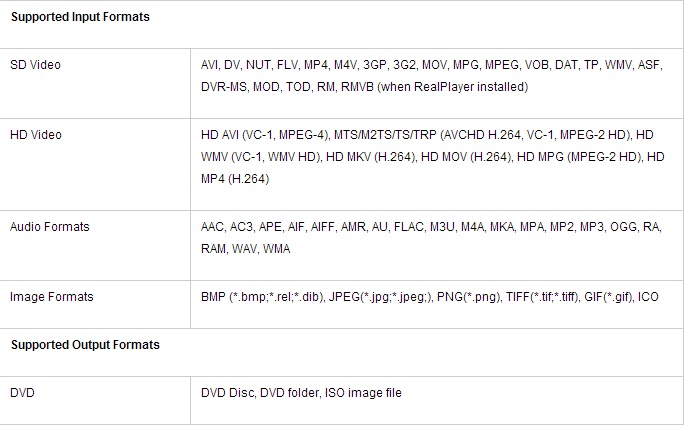
Specification of MXF Converter


Top Feedback
  • Make it so the it can convert things TO MXF
  • Add Format compatibility 
  • Include an update feature, but leave it unselected 
Focal Spot Tracking

Compared with the general video converter, Aiseesoft MXF Converter software is different with its special support MXF video formats. And this makes its more comprehensive converter. A report made by GOTD showed that 83% of 1000 participators with high satisfaction degree, and most of the rest 17% of 1000 participators thought the MXF supported funciton was unnecessary, because they didn't own a MXF device. The data also reflects that a quarter of participators hope that Aiseesoft MXF Converter can support output the MXF format in future. As the report said in the end, "It is really a nice converter, professional/quick/easy".

You can download the soft at its office website, but can only get the relevant coupon code in moyeameida.com.


Monday, May 27, 2013

A wonderful DVD creator: Wondershare DVD Creator

Want to make your own movies? Or maybe you just want to finally burn that film collection on your computer to DVD. Whatever you want to watch, Wondershare DVD Creator does it all.

Simply drag your favorite feature film into DVD Creator, adjust the quality and click burn. Or use DVD Creator’s powerful built-in editor to combine your own photos, videos and music into home movies, slideshow, really whatever your imagination can handle.

Pros
  • Burn Video, Photos and Audio in Any Format.
  • Built-in editor is offered for retouching imported videos.
  • Support all popular recordable disc types: DVD–5 and DVD–9; DVD-R, DVD+R, DVD-RW, DVD+RW, DVD+R DL, DVD-R DL, DVD-RAM.
  • Customize DVD with 40 free static and dynamic DVD menu templates.
Cons
  • External audio tracks are not supported
  • External subtitle is not supported.
  • Not support adding 3D effect.

The Verdict
  • Easy to use, does exactly what it's supposed to. In today's society it's hard to find a real value but this is it.
Specification

In a recent survey, there are 613 valid participants, about 80% among them thought the software was really wonderful, they could make their home movie easier and faster. Even so the soft still has its limitation, the maintain feedback as the following table shows.


Now, the publisher Wondershare software make a decision that adjust the mostly products' price with coupon code up to 45% off. You can search "wondershare" at moyeamedia.com get the big deal.