Showing posts with label 2D video to 3D. Show all posts

Monday, July 15, 2013

Amazing DVD & Video conversion Software : Aiseesoft Video Converter Ultimate Review

Aiseesoft Video Converter Ultimate is the best assistant for video fans. It can help users convert any video/audio file, such as MP4, WMV, AVI, MKV, MOV, MTS, M2TS, MXF, FLV, MPEG, MP3, AAC, FLAC, AIFF, WAV, WMA, etc. It can also convert DVDs to video file easily both commercial and home-made DVD. If you are a 3D lover, it is your choice.

It can convert both DVD and video to 3D effect easily and it provides Anaglyph (Red/cyan), Side By Side (Full), Side by Side (Half-Width), Top and Bottom (Full), Top and Bottom (Half-Height). It can also directly convert DVD/video to mobile devices, such as iPad, iPhone, iPod, Samsung Galaxy S4, Samsung Galaxy Note 2, Kindle Fire and many other popular mobile devices.


Key Features
  • Convert DVD and videos to 2D/3D video files
  • Extract audio track from DVD and videos
  • Support iPhone/iPad/iPod and other popular portable devices
  • Powerful video editing features
Screenshot
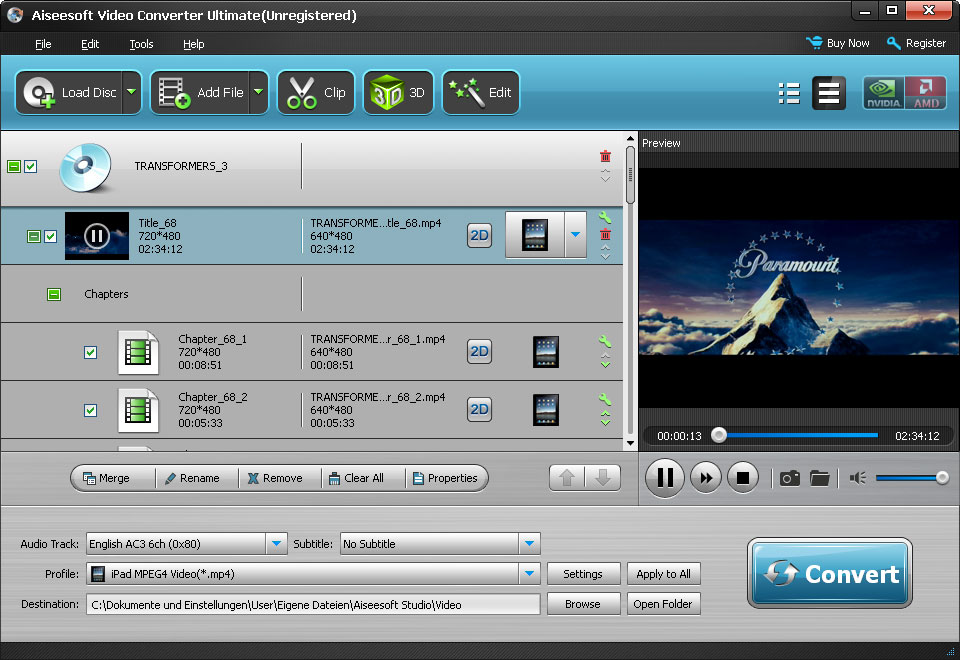

Top Feedback
  • Made the video no longer full-screen in “Full Screen” mode
  • Little “preview” screen’s audio lagged and stuttered
  • Need to have a :'Keep original resolution' setting 
  • Convert DVD/Video to mobile devices
  • Edit output video’s effect, trim, crop, merge output video files, add watermark, take snapshot
  • Convert DVD/video really fast
Focal Spot Tracking

The only way a video converter will attract its buyers is with an increase in speed during the conversion as there are a lot of video converters available. In a small test, someone tried to convert a 1-hour AVI file to a WMV and it was impressively fast, taking just over 17 minutes as a background task while same worked on something else.

Aiseesoft unveil two different edition software: Total Video Converter Platinum and Video Converter Ultimate. Comparing with these two edition, you will find the significant difference is that Video Converter Ultimate offers video & audio out, + DVD processing (ripping and burning), and Total Video Converter Platinum has no DVD processing. Therefore, the price of former is a little higher than the latter.

Now, both are on discount with 50% off, you can save at least $17.50 for each one. Use code:EASY-RABG-ISEE for Aiseesoft Video Converter Ultimate and Code:EASY-RABG-ISEE for Total Video Converter on moyeamedia.com, you can get the big deal than on their  official website.

Monday, June 17, 2013

A Best Easy Use Professional Media Converter: Leawo DVD Ripper

As a professional media converter, Leawo DVD Ripper is far more than a simple DVD to video converter. It is also a DVD to audio converter, video editor, 2D DVD to 3D video converter, etc. It provides the best solution to convert DVD to video in both 2D and 3D effects, and extract audio out of DVD as well. It could easily convert DVD to video and audios in various formats like AVI, MP4, WEBM, RMVB, RM, MPG, MPEG, VOB, MOV, M4V, FLV, F4V, MKV, FLAC, AAC, AC3, AIFF, AMR, M4A, MP2, MP3, 3D MP4, 3D WMV, 3D AVI, 3D MKV, 3D YouTube video, etc.


Leawo DVD Ripper could also let you adjust the video and audio parameters of output video and audio files, including video size, quality, video codec, bit rate, aspect ratio, frame rate, audio codec, channel, etc. It could convert DVD for multiple uses: editing in iMovie, Final Cut Pro and other video editing software programs, uploading to YouTube, blog or website for sharing, or playback on different media players like iPhone 5, iPad mini, iPad 4, HTC One, Surface, Galaxy S 4, etc. Other wonderful features include: convert 2D DVD to 3D video with 6 different 3D movie effects available, customize videos with practical video editing features, choose subtitles and audio tracks from source DVD, etc. What’s more, Leawo DVD Ripper could make DVD discs region free and solve CSS-DVD disc converting.

Key Features
  • Rip DVD to video and audio in all fashionable formats for widely use
  • Powerful DIY functions in this all-inclusive DVD Converter
  • Trendiest 3D creating feature for 3D video entertainment

Specification


Top Feedback

  • The conversion is fast enough but it can be much better.
  • Built-in editor needs is quite limited, but the usages is quite practical.
Focal spot tracking

Time is money! For most people take lots of time in studying a software which has nothing to do with work. As a professional DVD ripper, Leawo DVD Ripper is mean to help people enjoy their videos at will. So this software is being designed easily to user. Leawo DVD Ripper requires no technical knowledge for operation and only several clicks with import-export will finish the conversion. You can click here and learn more about the user guide.

If you want to enjoy the software in a lower price, you can visit moyeamedia, get the coupon code.


Thursday, June 6, 2013

Magic video tool: Pavtube Media Magician for Windows and Mac

Pavtube Media Magician is a powerful camcorder resource manager and converter. It will help manage and convert camcorder footage on Windows or Mac, directly upload videos to YouTube for sharing, or output for further editing. Notable features include smart camcorder wizard, timeline-oriented editing, accurate trimming and cutting, lossless joining MTS/ M2TS/ MOD/ TOD to original format or MKV, Apple ProRes ouput for FCP editing (Mac only), and more.

Key features:

  • Smart Camcorder Wizard helps import and backup with clicks.
  • Transcode camcorder AVCHD MTS/ M2TS/ MXF/ MOV, and common TiVo, MKV, etc.
  • Capture clear image from source video.
  • Add 3D effect to camcorder videos converting 2D to 3D.
  • Accurate trim and cut videos on timeline.
  • Multi-task and multi-format conversion at one time.
  • Lossless combine MTS/ M2TS/ MOD/ TOD to original format or MKV.
  • Output files for FCP/ iMovie/ FCE, etc. (Mac only)
  • Convert files for editing in Avid Studio/ Adobe Premiere/ Sony Vegus, etc.
  • Convert camcorder and common videos for Apple and Android tablets and phones.
  • Upload to YouTube directly with account and video info.


Specification:


Top Feedback:
  • Be able to rotate a video at import or before edit for output
  • Looks good, sounds good, has to be good
  • Preserve MKV subtitles and 5.1 sound  
  • Trim MKV files without reencoding
  • Remove shaking from a video
  • support full screen mode on Netbook
  • Installed fine
Focal spot tracking

Video editing software is often difficult for beginners, in part because the terminology used to label controls is unfamiliar and in part because the number of controls and unfamiliar terms is often vast. Beginners can sometimes be forgiven for wondering if they accidentally obtained a foreign language version. But once you install this software, you can see the hopeful user guide, and the friendly user interface. And this is really deservedly named magician.

Now, you can learn more at its officer website, and you can also get the coupon code with 20% off at here.